- Published on
Understanding and Using ConfigMaps in Kubernetes: Step-by-Step Tutorial
- Authors

- Name
- Sneha Tuladhar
- @
Table of Contents
- Introduction
- Prerequisites
- Introduction to ConfigMaps
- Problem with Environment Variables and Why ConfigMap Was Introduced
- Key Points
- Creating ConfigMaps
- Using ConfigMaps in Pods
- Mapping Temporary Users in a ConfigMap
- Best Practices
- Conclusion
Introduction
Kubernetes ConfigMaps allow you to decouple configuration artifacts from application logic.
They provide a way to store non-confidential data in key-value pairs and make it accessible to your applications running in the cluster.
Prerequisites
Before diving into this guide, ensure you have the following:
- A basic understanding of Kubernetes concepts like pods, services, and deployments.
- The kubectl command-line tool installed and configured to interact with your Kubernetes cluster.
Introduction to ConfigMaps
A ConfigMap is an API object in Kubernetes used to store non-confidential configuration data in key-value pairs.
It allows you to keep application configurations separate from the application code.
Problem with Environment Variables and Why ConfigMap Was Introduced
Managing application configurations through environment variables in Kubernetes can lead to several challenges:
- As applications scale, maintaining consistent variables across multiple pods becomes harder.
- Duplicating the same variables across configurations introduces inefficiencies.
- Changes to these variables often require pod restarts, disrupting application availability.
- Mixing configuration with application logic complicates deployment and reduces maintainability.
To address these issues, Kubernetes introduced ConfigMaps, a dedicated resource for managing non-sensitive configuration data in key-value pairs.
Advantages of ConfigMaps:
- Centralized and reusable configuration management
- Dynamic updates without pod restarts (when mounted as volumes)
- Clear separation of application logic from configuration
This improves scalability, maintainability, and efficiency in Kubernetes deployments.
Key Points
- The scope of a ConfigMap is limited to the namespace in which it is created.
Creating ConfigMaps
1. Using Literals
You can create a ConfigMap directly using key-value pairs:
kubectl create configmap <name> --from-literal=<key>=<value>
2. From Multiple Literals
You can include multiple key-value pairs:
kubectl create configmap <name> --from-literal=<key>=<value> --from-literal=<key>=<value>
3. From a file
kubectl create configmap <name> --configmap-3 --from-file=data-file
Using ConfigMaps in Pods
There are three ways to use ConfigMaps in pods:
- Environment Variables: Use
envFromorenvin the pod's spec to inject ConfigMap data as environment variables. - Command-line Arguments: Reference ConfigMap keys directly in container commands or
args. - Mounted Volumes: Mount the ConfigMap as a volume, where each key-value pair is represented as a file.
Hands-On Lab: Inject ConfigMap as Environment Variables
To inject all keys in a ConfigMap as environment variables, first create a ConfigMap from a literal value:
kubectl create configmap configmap-1 --from-literal=name=first-configmap
cm-1.yaml:
apiVersion: v1
kind: Pod
metadata:
  name: configmap-1
spec:
  containers:
  - name: demo-container
    image: nginx
    envFrom:
    - configMapRef:
        name: configmap-1
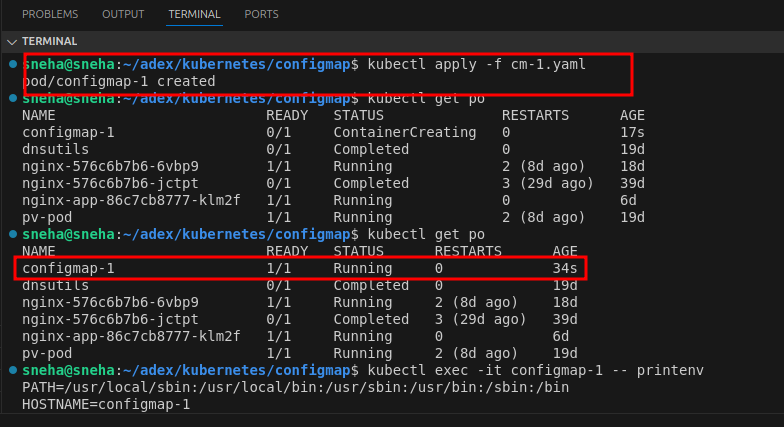
Apply the configuration:
kubectl apply -f cm-1.yaml
- Inject Specific Keys as Environment Variables Use the valueFrom attribute to specify keys:
cm-2.yaml:
apiVersion: v1
kind: Pod
metadata:
  name: configmap-2
spec:
  containers:
  - name: demo-container
    image: nginx
    env:
    - name: COLOR
      valueFrom:
        configMapKeyRef:
          name: configmap-2
          key: color
Apply the configuration:
kubectl apply -f cm-2.yaml
For printing the environment variable:
kubectl exec -it configmap-1 -- printenv

- Mount ConfigMap as a File Create a file data-file:
username="root"
password="12345"
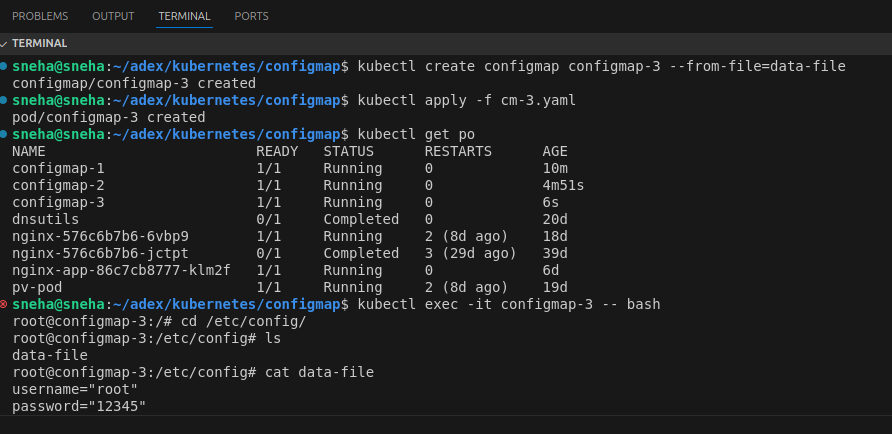
kubectl create configmap configmap-3 --from-file=data-file
You can mount a ConfigMap as a volume inside a pod:
cm-3.yaml:
apiVersion: v1
kind: Pod
metadata:
  name: configmap-3
spec:
  containers:
  - name: demo-container
    image: nginx
    volumeMounts:
    - name: config
      mountPath: /etc/config
  volumes:
  - name: config
    configMap:
      name: configmap-3
Apply the configuration:
kubectl apply -f cm-3.yaml
Check the mounted file inside the pod:
kubectl exec -it configmap-3 -- cat /etc/config/data-file
Output:
Inspecting ConfigMaps
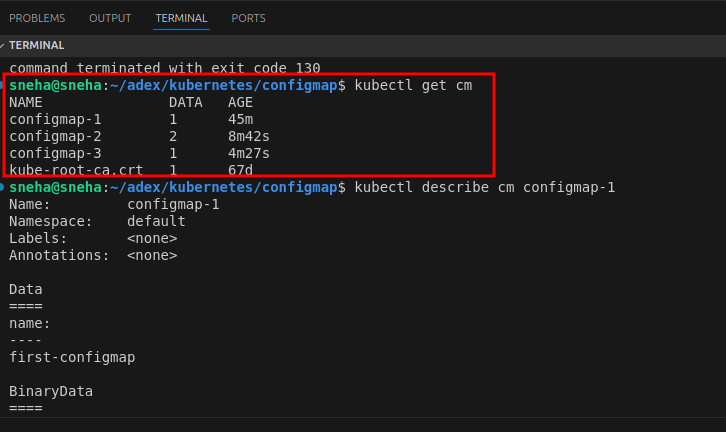
To see the ConfigMaps created in your Kubernetes cluster, use the following command:
kubectl get cm
To view details of a ConfigMap:
kubectl describe cm configmap-3
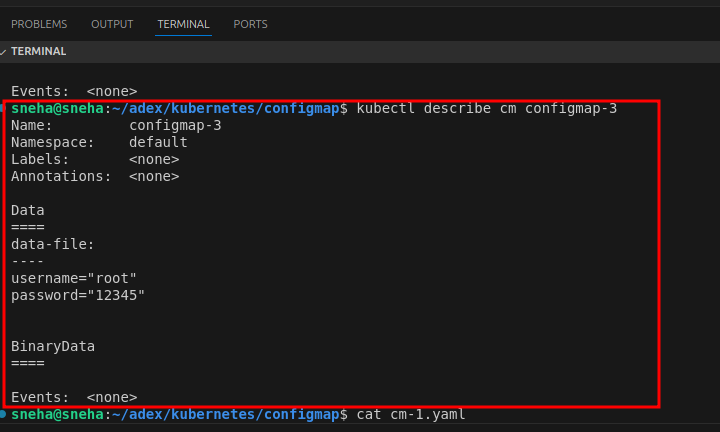
From the output of kubectl describe cm configmap-3, we see the ConfigMap contains sensitive data such as:
username="root" password="12345"
This demonstrates that ConfigMaps are not designed to store secrets because their data is not encrypted and is visible in plain text. ConfigMaps are intended for non-sensitive configuration data. For sensitive information like usernames and passwords, Kubernetes provides Secrets, which encode data in base64 and offer better security practices for managing sensitive information.
Mapping Temporary Users in a ConfigMap
A ConfigMap in Kubernetes stores non-sensitive configuration data in key-value pairs and can be used to map temporary user details like usernames and expiry dates. By referencing the ConfigMap in a Pod, applications can dynamically access user data via environment variables or mounted files. This approach decouples user-specific data from application code, enabling easier updates and management.
Note: ConfigMaps are ideal for non-sensitive data and should not store secrets. For sensitive information, use Kubernetes Secrets.
This method is especially useful for scenarios requiring temporary access or dynamic configuration updates without redeploying the application. The ConfigMap is created using YAML files or the kubectl create command and then linked to the Pod through environment variables or volume mounts. This ensures applications can efficiently access and manage user-specific configurations while keeping sensitive data secure in dedicated Secret objects.
Hands-On Practice: Map Temporary Users
Step 1: Create the ConfigMap YAML file
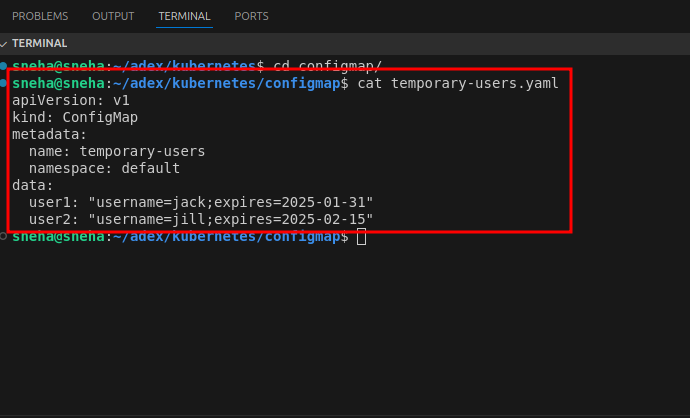
Step 2: Apply the ConfigMap 1.Apply the ConfigMap to your Kubernetes cluster:
kubectl apply -f temporary-users.yaml
2.Verify that the ConfigMap has been created:
kubectl get configmap temporary-users -o yaml
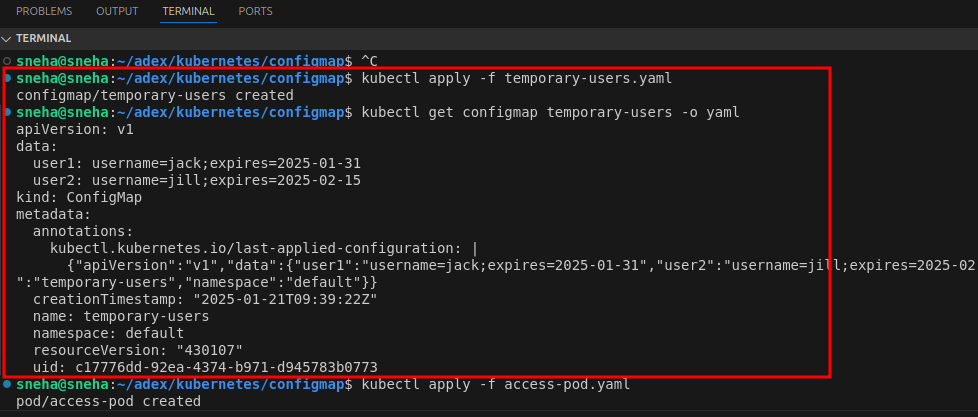
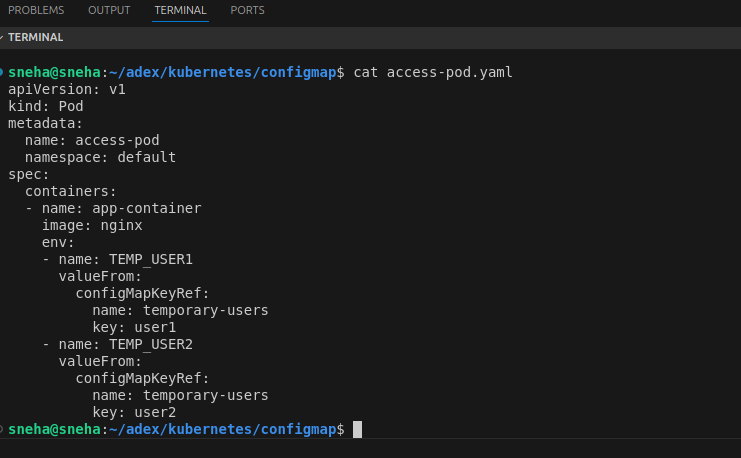
Step 3: Create a Pod YAML file Create a file named access-pod.yaml to define a Pod that uses the ConfigMap then Add the following content to the file:
Step 4:Deploy the Pod 1.Apply the Pod configuration:
kubectl apply -f access-pod.yaml
2.Confirm the Pod is running:
kubectl get pod
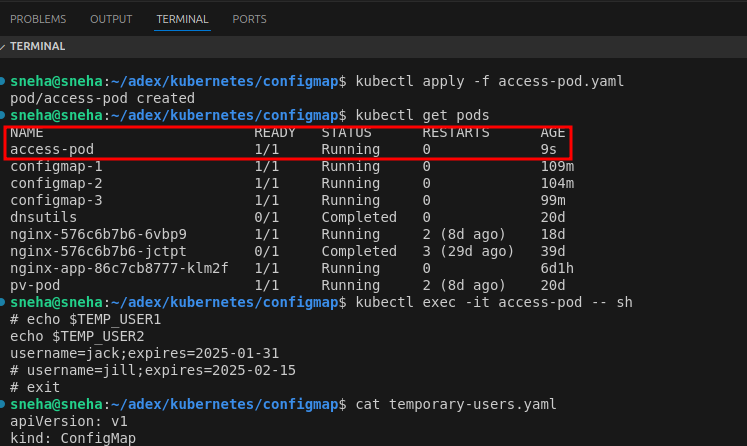
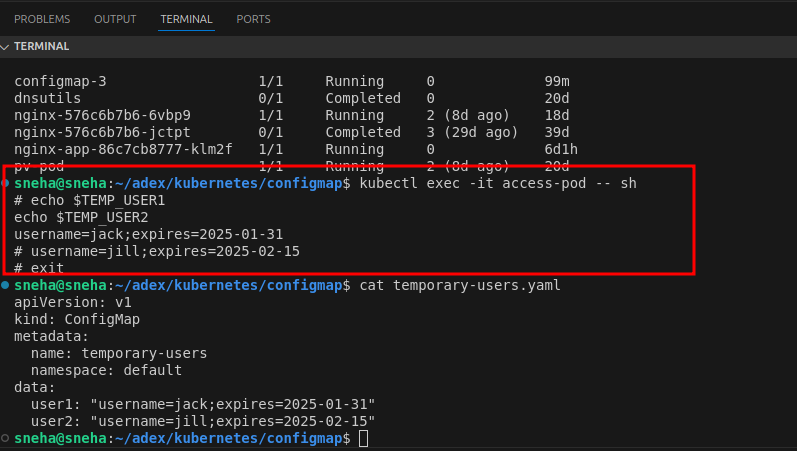
Step 5: Check Environment Variables in the Pod 1.Access the Pod shell:
kubectl exec -it access-pod -- sh
2.Inside the Pod, print the environment variables to check if the ConfigMap values are loaded:
echo $TEMP_USER1 echo $TEMP_USER2
You should see:
Best Practices
- Use ConfigMaps for non-confidential configurations. For sensitive data, use Secrets.
- Version your ConfigMaps to manage changes effectively.
- Ensure the ConfigMap exists before deploying a pod or application that depends on it.
Conclusion
ConfigMaps are a powerful feature in Kubernetes, enabling seamless configuration management. They help maintain the separation of concerns by decoupling configuration data from application code, making deployments flexible and manageable.
By understanding and implementing ConfigMaps, you can significantly enhance the robustness and scalability of your Kubernetes applications.